Audience segmentation is a fundamental tool for marketers to enhance the effectiveness of their marketing efforts, improve customer engagement, and ultimately achieve better business outcomes. It's an essential component of the Treasure Data Audience Studio, and now it's even better with the addition of the new Segment Insights Dashboard.Segment Insights enables users to quickly and easily create segment dashboards within Audience Studio using a no-code experience. Users can now view the impact of segment rules in real-time, eliminating guesswork and creating more accurate segments that drive connected customer experiences.
Improving the Way Marketers Create Segments
Building the most effective segments for marketing campaigns takes time. Audience and campaign managers spend a lot of time exploring audience attribute data to validate segments and discover new segments they can build campaigns around. While creating segments is easy to do in the Treasure Data Audience Studio, there wasn't a way to see how the segment changed as the marketer added rules that impacted the segment. A marketer would have to use an external BI tool to create segment dashboards. It took time and involved a lot of guesswork as new segments were built.That's changed with the addition of Segment Insights inside Audience Studio. Now, when a marketer creates a new segment, they can visualize the impact of segments rules on that segment through a series of pre-configured, in-app visualization dashboards.
Working With Segment Insights
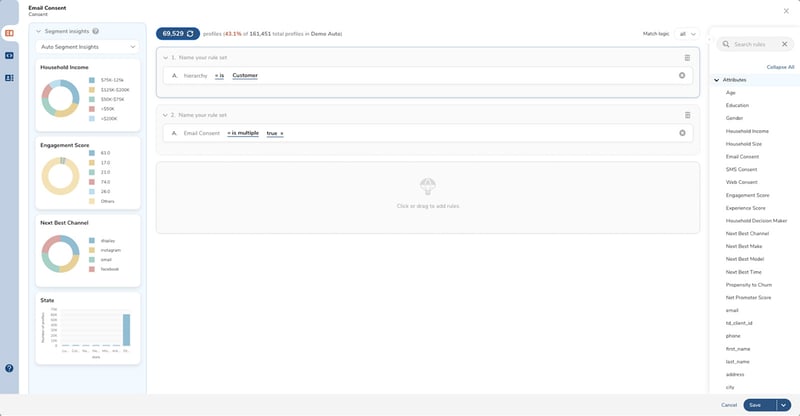
So how does it work? When you go to the parent segment in the Studio, you'll see a Segment Insights tab in the root folder of the selected parent segment where you can define Segment Insight dashboards. For each dashboard, you define up to ten widgets that visualize your segment using different metrics. For example, you can create a widget that shows the breakdown of the segment by age or location. Creating dashboards and widgets is straightforward. It's a no-code solution that allows non-technical users to build dashboards quickly and easily through a combination of drag-and-drop and drop-down selections. Once you create your dashboards, you can access them inside the parent segment in Audience Studio, where you edit segment rules. The default Segment Insights Dashboard will open on the left-hand side of the screen.
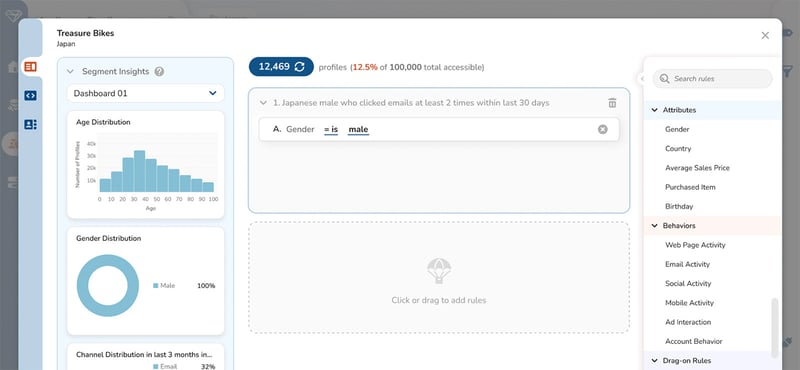
As you add or change segment rules, you only have to click the Refresh button, and the dashboard automatically updates to show new insights. Now, you can quickly and effectively understand your audience and refine it to create highly targeted segments for personalization at scale, all within the Audience Studio.
Empower Smarter Segment Decisions with Real-Time Data
Embedding visual analytics insights the Audience Studio drives operational efficiencies. Real-time access to the full segment data as they create and refine new segments means marketers can make smarter, faster, better decisions. And it means that campaigns are built on segments grounded in good data, improving ROI and conversions.In-app analytics and insights are table stakes today for marketers who need to make data-driven decisions fast, and now you have them inside the Audience Studio. Learn more about Segment Insights for Treasure Data Audience Studio.